had to reopen PR because it was just too much of a pain to amend commits.
1 Like
@dzervas can you post your approval for being a maintainer with me in the PR? Please and thank you!
Heyo. I got compilation from source working (chore: use https for ts-tiny-activerecord by ellie · Pull Request #58 · atuinsh/desktop · GitHub really helped  ).
).
Quick question, did logging in to Atuin hub ever work on NixOS for you, @dzervas @randoneering? It never worked on my setup (logging in with the auth token stays on clicking the `Atuin Hub Connection` accept button, which does nothing, no error, no logs), but since no one other complained, I thought it was something with my rather peculiar setup. But since it does not work even when compiling from source, it gets suspicious now.
@Adda Atuin Desktop needs an already available keyring. On systems without, the behavior is exactly as you described.
At the start of Atuin Desktop, you should get a popup like this, unless the default keyring is already unlocked:
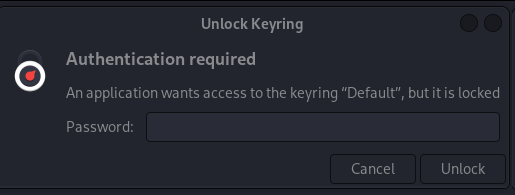
If you get this, logging in should work.
I’m using gnome-keyring, seahorse should display something like this:
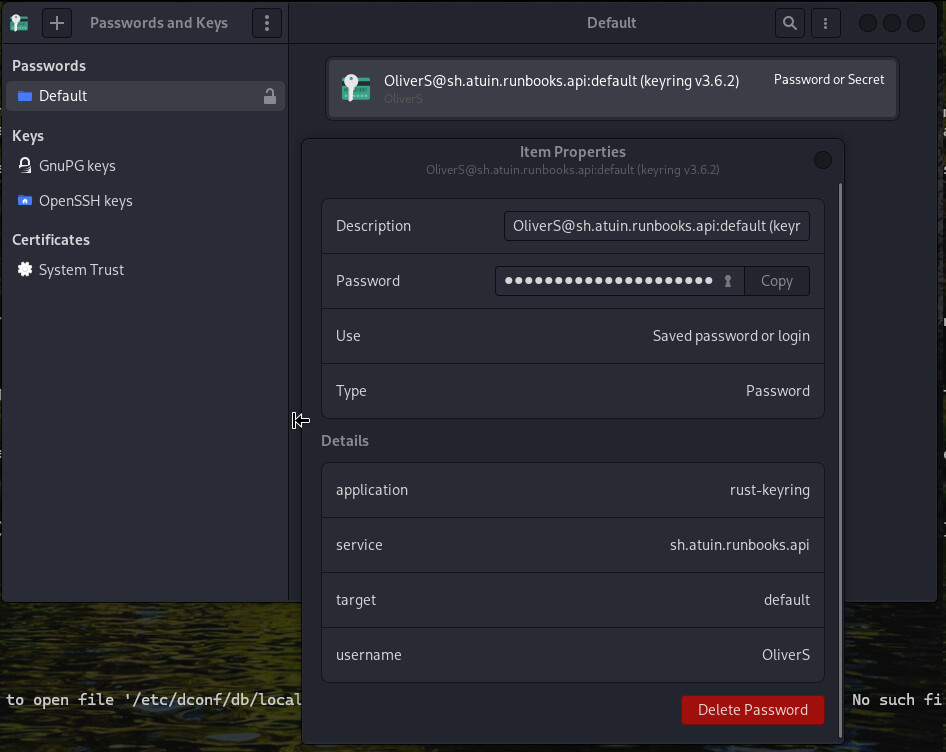

2 Likes
I never used hub but I will start doing so for testing purposes. Thank you for creating the PR for the source build. I added a note for you to add me as a maintainer as well. Also, I can test the build on my macbook for work when I am logged in on Tuesday. Currently on vacation for daughters birthday.
1 Like
@Adda just to avoid crowding the PR, I will ask questions here.
You mentioned looking at the logs when trying to login to Atuin Hub. I wasn’t able to find any log for the binary other than the running log when you execute the binary in terminal. Where would I need to look for this?
Feel free to ask in the PR. That is what they are for. Yeah, the log when running the app from the PR. Any errors when running on Darwin?
Woohoo, awesome work everyone! Thank you
Yeah, we were tripped a bit about Atuin Desktop 1.4 and higher requiring Rust 1.90 (which is not supported by nixpkgs as of now) transitively, but all should be well once the support for Rust lands. Btw., we noticed you are running tests only on Linux, but not on MacOS in your CI pipeline. We found a few failing tests (click the dropdown toggles `Error logs` below the red icons) on Darwin (MacOS). I think they are not Nix-related, but I have not tested it further. If you could have a look, is that something you think is an upstream issue? Is testing for MacOS even desired?
You talking to me? Haha.
We should probably run them, but did not do so pre-open sourcing because the runners were too expensive. I’ll add them now!
I’ve seen those tests have issues with some runner environments, as they can be sensitive to the local setup. Fairly sure they’re more robust in future versions
1 Like
Yeah the macOS tests fail on CI. Need to figure out what’s different there, because they pass locally (and we run them ALL the time). Something funky with the env I imagine.
1 Like
Out of curiosity - If I wanted to build a version of atuin-desktop that only required the older rustc v1.89 so I could build newer versions of atuin-desktop on nixos, is there a “nix” way to pull that off?
Or I guess alternately, if there’s a way to pass in a custom build of v1.90 rustc for the atuin-desktop build?
^ Forgive my clearly apparent lack of understanding of the OS I use daily, this is more a request for proper nixos terminology so I can try to figure it out myself.
Sure, it is possible. However, it would take a lot of effort. The Atuin ecosystem requires Rust 1.90 at multiple places, including the Atuin CLI tools (IIRC). That would require adding patches to all the dependencies which require Rust 1.90 and patching their Cargo.toml files to require older Rust versions. After that, you would have to revert all commits which use the Rust 1.90 features, if there are any. I would truly recommend just waiting a bit for Rust 1.90 to land in nixpkgs and us updating the package.
Alternatively, you could set up a development environment, install rustup or something, get the newer Rust version, and try to build Atuin Desktop from there manually. You can then set up your local packages so that the manual process is automatically performed on rebuild of your system (assuming usage of NixOS here), and run Atuin Desktop not from nixpkgs, but from your locally defined packages.
You can also just grab the existing PR for Rust 1.90 rust: 1.89.0 -> 1.90.0 by NyCodeGHG · Pull Request #451179 · NixOS/nixpkgs · GitHub and use this as the Rust passed to the local package derivation or override the attrset passed to the nixpkgs package with this newer Rust version.
You can also build local packages using 3rd-party flakes such as GitHub - ipetkov/crane: A Nix library for building cargo projects. Never build twice thanks to incremental artifact caching. or GitHub - nix-community/fenix: Rust toolchains and rust-analyzer nightly for Nix [maintainers=@figsoda, @winterqt, @eureka-cpu] which support different versions of Rust.
Just popping into mention that Atuin Desktop v0.2.4+ will require libasound2-dev / alsaLib to build
2 Likes
Thank you kindly for the notification. Updating right now.