The selected command seems to use the AlertError color from the theme, same as failed commands. I would expect it to use e.g. Important. Do I have this right? Is there any way to change the color of the selected command (without changing the color of failed commands)?
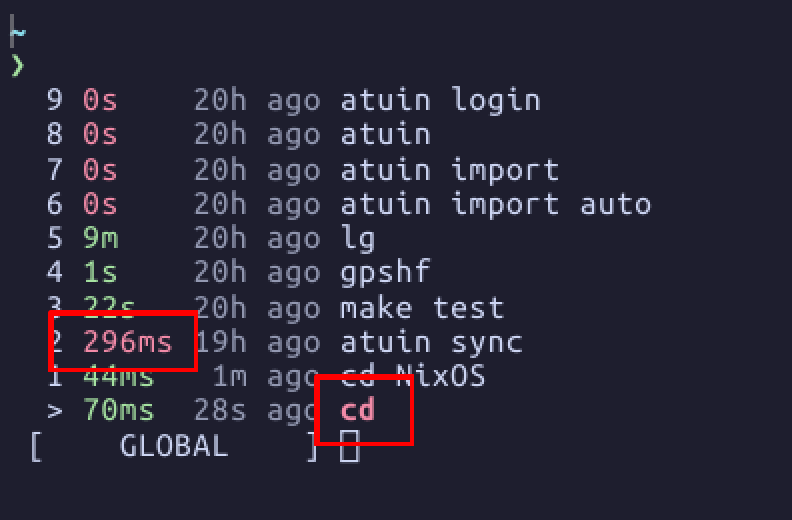
I’ve noticed this too and code-dived to find that it is highlighting matches with the Error color.
For anyone else wondering, here is the relevant line: atuin/crates/atuin/src/command/client/search/history_list.rs at 0eecc0b43dbf12dfb1f75da94151cd759a6f4782 · JoaquinTrinanes/atuin · GitHub
On NixOS, I ended up writing this patch:
programs.atuin.package = pkgs-unstable.atuin.overrideAttrs (old: {
  patches = (old.patches or [ ]) ++ [
    ./atuin-color.patch
  ];
});
diff --git a/crates/atuin/src/command/client/search/history_list.rs b/crates/atuin/src/command/client/search/history_list.rs
index bed883c7..2297769d 100644
--- a/crates/atuin/src/command/client/search/history_list.rs
+++ b/crates/atuin/src/command/client/search/history_list.rs
@@ -226,7 +226,7 @@ impl DrawState<'_> {
         {
             row_highlighted = true;
             // if not applying alternative highlighting to the whole row, color the command
-            style = self.theme.as_style(Meaning::AlertError);
+            style = self.theme.as_style(Meaning::Annotation);
             style.attributes.set(style::Attribute::Bold);
         }
I chose Meaning::Annotation, because in the Catppuccin theme this is your accent color. Important is still red, and Title falls back on Important for some reason.